
• Skip to main content
  • Skip to secondary menu
  • Skip to primary sidebar
  • Home
  • Privacy Directory
  • Deplatforming
  • Services
    • Internet Privacy
    • Individual Reputation
    • Business Reputation
    • Social Media Privacy
    • Mugshot Removal
  • Resources
    • Online Privacy Videos
    • Online Security Tips
  • Contact Us

Internet Removal

The Source For Online Privacy

  • General News
    • Social Media Privacy
  • Facebook Privacy
  • Mugshot Removal
    • Mugshots.com Criminal Case
  • Phishing
  • People Finder
  • Voting Sites

How to View a LinkedIn Profile Anonymously – LinkedIn Privacy Setting

May 22, 2012

How to view a Linkedin Profile Aonymously

LinkedIn – Did you know LinkedIn Premium Members are notified after you View their Profile?
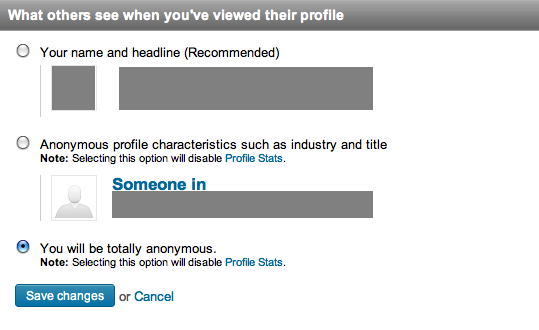
What Others See When You've Viewed Their Profile

The default setting in LinkedIn is to allow LinkedIn Members to see Who Viewed Their Profile. Most business users have LinkedIn Accounts and they are unaware of this online privacy setting. Here are instructions to disable this setting.

  1. Log-in to your Linked-In Account.
  2. From the LinkedIn Home Menu, under Your Name in the upper top right corner, select Settings.
  3. Under Privacy Controls, select Select what others see when you’ve viewed their profile.
  4. Under What others see when you’ve viewed their profile (see the graphic above), select You will be totally anonymous.

There are some LinkedIn users that use that don’t mind letting LinkedIn members know they viewed your profile. That said, most individuals setup their LinkedIn account many years ago and have not taken the time to review these online privacy settings.

If you or your business needs further assistance, you can call or contact us.


Filed Under: Business Privacy, General News Tagged With: anonymous profile viewing, linkedin, linkedin anonymous profile, linkedin privacy

Reader Interactions

Trackbacks

  1. LinkedIn Privacy Settings - How to ensure your LinkedIn Account is Secure says:
    May 23, 2012 at 11:11 am

    […] Headline is displayed to LinkedIn Members when you view others profile. Select the last option to View Anonymously. Who can see your […]

Primary Sidebar

Subscribe to Our Newsletter

  • Facebook
  • Instagram
  • Twitter

Recent Posts

  • Congress Passes Take It Down Act
  • Is This Nonconsensual Intimate Imagery or Artwork?
  • iPhone Calendar Virus / Rogue Subscribed Calendar
  • Criminal Case: Mugshots.com Owners Charged with 51 Counts
  • Democratic Senators Introduce Bill to Repeal Section 230

Archives

  • May 2025
  • July 2021
  • June 2021
  • February 2021
  • June 2018
  • May 2018
  • April 2018
  • February 2017
  • November 2016
  • June 2016
  • February 2016
  • July 2015
  • April 2015
  • February 2015
  • January 2015
  • March 2014
  • December 2013
  • October 2013
  • September 2013
  • July 2013
  • June 2013
  • March 2013
  • December 2012
  • October 2012
  • July 2012
  • June 2012
  • May 2012
  • April 2012
  • March 2012
  • February 2012

Categories

  • Business Privacy
  • Calendar Virus
  • Communications Decency Act
  • Company
  • Cyber Exploitation
  • Cyberstalking
  • Dating Sites
  • Facebook Privacy
  • Fake News
  • Featured News
  • General News
  • Google Search
  • Internet Privacy
  • iPhone Spam
  • Legal
  • Local Search
  • Mass Compromise
  • Mobile Privacy Tip
  • Mugshot Removal
  • Mugshots.com Criminal Case
  • Online Privacy
  • Online Security Tips
  • People Finder
  • Phishing
  • Privacy
  • revenge porn
  • Right To Be Forgotten
  • Section 230
  • Social Media Privacy
  • Stalking
  • Take It Down Act
  • Telemarketing
  • Telemarketing – Robocalls
  • Uncategorized
  • UnpublishArrest.com
  • Voting Site Removal

Meta

  • Log in
  • Entries feed
  • Comments feed
  • WordPress.org

Internet Removal Privacy Directory

About Us · Terms · Disclosure · Privacy · Contact Us

www.InternetRemoval.com · 1-888-591-9828

Copyright 2012-© 2026