• Skip to main content
  • Skip to secondary menu
  • Skip to primary sidebar
  • Home
  • Privacy Directory
  • Deplatforming
  • Services
    • Internet Privacy
    • Individual Reputation
    • Business Reputation
    • Social Media Privacy
    • Mugshot Removal
  • Resources
    • Online Privacy Videos
    • Online Security Tips
  • Contact Us

Internet Removal

The Source For Online Privacy

  • General News
    • Social Media Privacy
  • Facebook Privacy
  • Mugshot Removal
    • Mugshots.com Criminal Case
  • Phishing
  • People Finder
  • Voting Sites

How Do I Remove Viddy from your Facebook Wall – Videos I Watched

May 22, 2012

Viddy Removal Instructions, Viddy Privacy

Quick Removal Settings – How to Remove Videos I Watch

One of the most virus-like settings in Viddy is Videos I Watch. Each time you watch a Viddy Video, the video will be posted to your Facebook Timeline. Furthermore, to watch the Video, your Facebook Friends would have to join Viddy/add the Facebook App. Viddy is the new 15 Second Video Sharing App with 26 million users. Viddy celebrity investors include Shakira (Entertainer) , Jay-Z (Entertainer) , Will Smith (Actor) , Gerald Pique (Athlete), Jeff Kearl (Skill Candy) and Biz Stone (Twitter co-Founder) Here are instructions for Disabling this Setting.
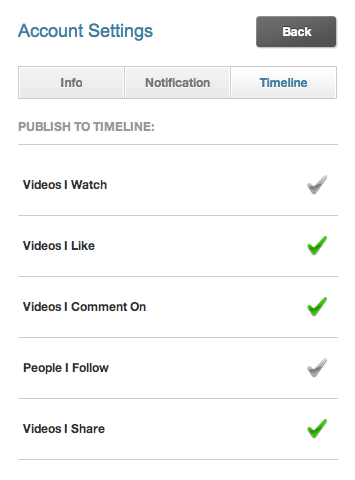
Viddy - Videos I watch Privacy Setting

By default, the feature to Publish Videos I Watch to your Facebook Timeline is selected. Here are instructions to disable or turn off the Videos I Watch setting in Viddy.

  1. From your Facebook Home Screen, Under Apps, select Viddy.
  2. Click Settings
  3. Under Account Settings, select Timeline from the top menu
  4. Under Publish to Timeline, de-select Videos I Watch (You may also want to de-select Videos I Share)
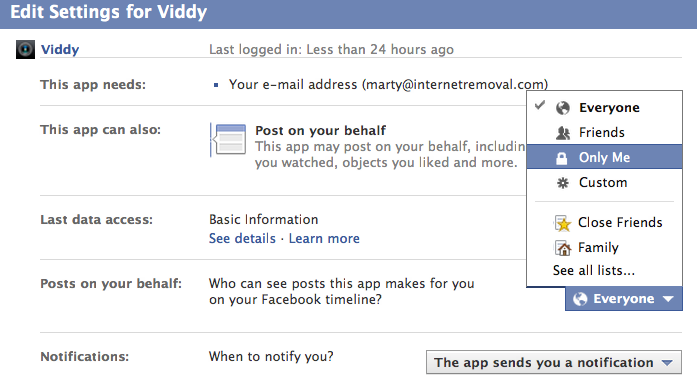
Viddy Sharing Options – Facebook Timline Posts on your behalf
You may also want to check your Viddy  Sharing Options. We selected Only Me, but you can set as Close Friends, Family if you have configured your Facebook Group settings.

Viddy Sharing Settings

Viddy Sharing

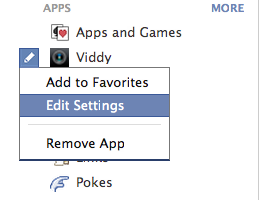
  1. From your Facebook Home Screen, Under Apps, just left of the Viddy Icon, select Edit Settings. The Edit button will appear when you position your mouse to the left of the Viddy Icon.
  2. Under Viddy, Posts on your behalf, the Default Option is Everyone. You can select Me, Close Friends, Family, or create a Custom Viddy distribution group for your videos.

Viddy iPhone App – Remove Videos I Watched Settings
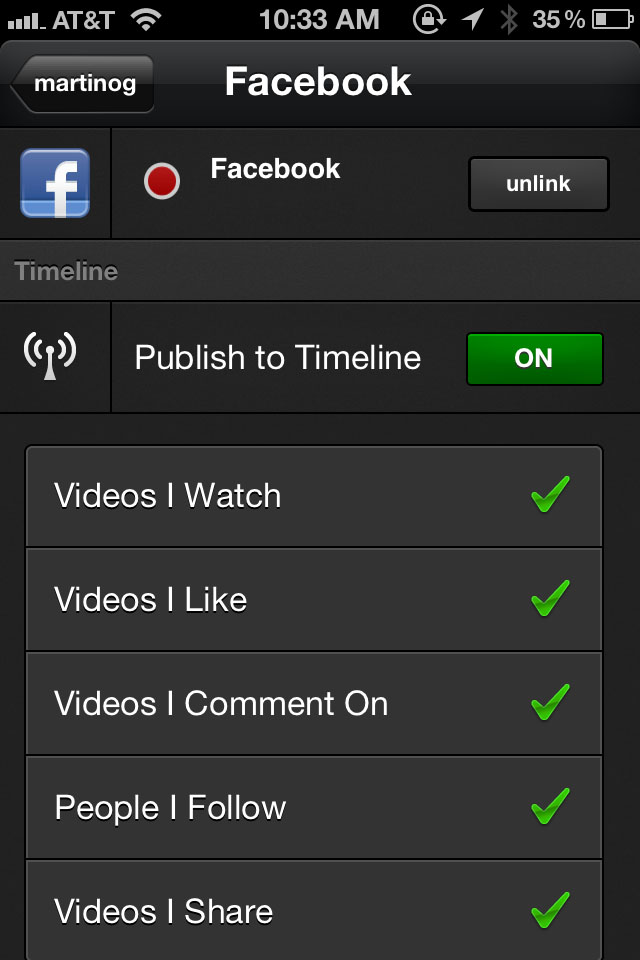
Viddy iPhone Remove Viddy

  1. From your iPhone, access the Viddy App
  2. Select the Icon in the right bottom corner of the screen with @
  3. Select the Settings Gear Icon in the right top of the screen
  4. Select Configure Services
  5. Select Facebook
  6. Under Publish to Timelime, de-select Videos I Watch. (We de-selected People I Follow)

Other Information

Social Off Viddy Setting

  • From your computer or desktop interface, Viddy has a Social Off Setting. You can disable Sharing using this setting.
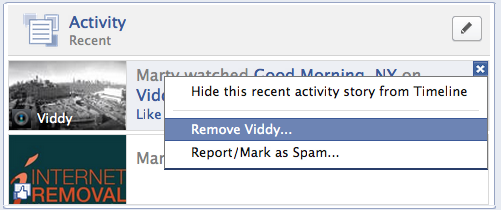
Remove Viddy – Instructions for Removing Viddy

Remove Viddy

  • From your computer or desktop interface, Viddy has a Remove Viddy or uninstall Viddy selection.
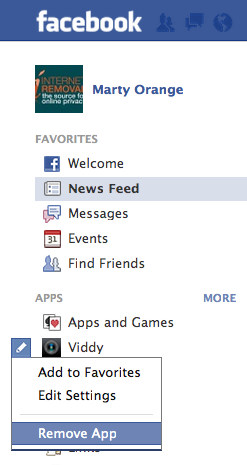
Uninstall Viddy

  • From Your Facebook Home Screen, Click Edit Settings, then Remove App

Filed Under: Facebook Privacy, General News Tagged With: socialcam privacy, viddy, viddy online privacy, viddy privacy

Primary Sidebar

Subscribe to Our Newsletter

  • Facebook
  • Instagram
  • Twitter

Recent Posts

  • Congress Passes Take It Down Act
  • Is This Nonconsensual Intimate Imagery or Artwork?
  • iPhone Calendar Virus / Rogue Subscribed Calendar
  • Criminal Case: Mugshots.com Owners Charged with 51 Counts
  • Democratic Senators Introduce Bill to Repeal Section 230

Archives

  • May 2025
  • July 2021
  • June 2021
  • February 2021
  • June 2018
  • May 2018
  • April 2018
  • February 2017
  • November 2016
  • June 2016
  • February 2016
  • July 2015
  • April 2015
  • February 2015
  • January 2015
  • March 2014
  • December 2013
  • October 2013
  • September 2013
  • July 2013
  • June 2013
  • March 2013
  • December 2012
  • October 2012
  • July 2012
  • June 2012
  • May 2012
  • April 2012
  • March 2012
  • February 2012

Categories

  • Business Privacy
  • Calendar Virus
  • Communications Decency Act
  • Company
  • Cyber Exploitation
  • Cyberstalking
  • Dating Sites
  • Facebook Privacy
  • Fake News
  • Featured News
  • General News
  • Google Search
  • Internet Privacy
  • iPhone Spam
  • Legal
  • Local Search
  • Mass Compromise
  • Mobile Privacy Tip
  • Mugshot Removal
  • Mugshots.com Criminal Case
  • Online Privacy
  • Online Security Tips
  • People Finder
  • Phishing
  • Privacy
  • revenge porn
  • Right To Be Forgotten
  • Section 230
  • Social Media Privacy
  • Stalking
  • Take It Down Act
  • Telemarketing
  • Telemarketing – Robocalls
  • Uncategorized
  • UnpublishArrest.com
  • Voting Site Removal

Meta

  • Log in
  • Entries feed
  • Comments feed
  • WordPress.org

Internet Removal Privacy Directory

About Us · Terms · Disclosure · Privacy · Contact Us

www.InternetRemoval.com · 1-888-591-9828

Copyright 2012-© 2026